April Fools Day 2D Illustration Guide
Visual humor is a distinct language. It relies on timing, exaggeration, and immediate recognition. When planning content for the first of April, the pressure to be funny often clashes with the need to be professional. This is where a curated April Fools Day 2D Illustration collection becomes an invaluable resource. Rather than starting from a blank canvas, creators can leverage pre-designed assets that capture the spirit of mischief without sacrificing design integrity. These assets are not just clip art; they are strategic tools for communication.
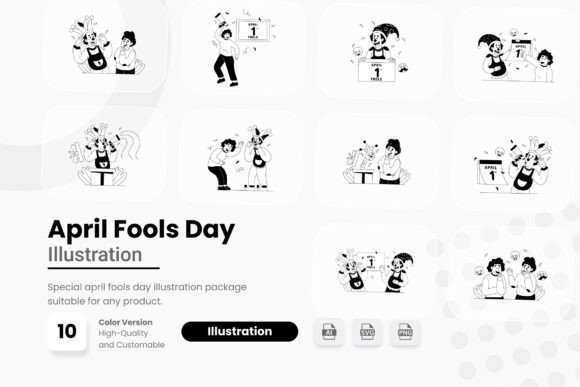
The specific asset pack in question offers a blend of comic-style graphics and vibrant decorative elements. It includes one AI file, ten SVG files, and ten PNG files, all featuring transparent backgrounds. This technical flexibility allows the illustrations to adapt to various mediums, from digital social posts to printed party invitations. Understanding how to utilize these resources effectively requires looking beyond the surface level of "funny pictures" and examining the practical needs of different users.
Why Visual Consistency Matters for Pranks
April Fools’ Day content often fails when it looks amateurish. A poorly executed joke can confuse the audience rather than delight them. High-quality 2D illustrations provide a layer of polish that signals intent. When a viewer sees clean lines, consistent color palettes, and professional comic-style styling, they understand that the content is crafted with care. This distinction is crucial for brands and professionals who want to engage in the holiday’s fun without damaging their reputation.
The inclusion of vector formats like AI and SVG ensures that scalability is never an issue. Whether you are designing a small icon for a website footer or a large banner for a storefront window, the image quality remains crisp. For those unfamiliar with vector graphics, this means the artwork will not pixelate when resized. The PNG files offer a quick alternative for users who need drag-and-drop simplicity for platforms that do not support vector editing.
Tailoring Usage to Your Role
Different professionals approach creative assets with unique priorities. What matters to a social media manager may differ significantly from what a small business owner values. Here is how various groups can evaluate and use this illustration pack.
Social Media Managers and Content Creators
For those managing feeds, speed is essential. Trends move quickly, and April Fools’ Day is a single-day event. Waiting days for custom illustrations is not feasible. This pack allows for rapid deployment. A creator can take a PNG with a transparent background, overlay it on a brand-colored backdrop, and add witty copy in minutes. The comic-style graphics are inherently shareable because they evoke nostalgia and lightheartedness. The priority here is efficiency and engagement. The goal is to stop the scroll with a visual that promises a laugh.
Small Business Owners and Marketers
Entrepreneurs often wear many hats, including that of the designer. They may not have advanced skills in Adobe Illustrator but still need professional-looking promotional materials. The AI file included in this pack serves as a master template. If a business owner has basic design knowledge, they can tweak colors to match their brand identity. If not, the ready-to-use PNGs are sufficient for email newsletters or in-store posters. The focus for this group is cost-effectiveness and brand safety. Using pre-vetted, high-quality assets reduces the risk of publishing something that looks unprofessional.
Educators and Community Leaders
Teachers and community organizers often look for ways to build rapport and lighten the mood. An April Fools’ themed worksheet or a playful announcement for a school event can benefit from friendly, non-offensive illustrations. The vibrant decorative elements in this pack can frame text or highlight important dates without being distracting. For educators, the priority is appropriateness and clarity. The comic style is universally understood and generally safe for all ages, making it a versatile choice for educational settings.
Freelance Designers
Professional designers might view asset packs differently. They are not looking for a final solution but for components to accelerate their workflow. The SVG files are particularly valuable here. A designer can import an SVG into their preferred software, ungroup the elements, and reassemble them to create something unique. This saves hours of drawing basic shapes or sketching comic bubbles. The value proposition for freelancers is flexibility and time savings. It allows them to bill fewer hours for asset creation while delivering high-quality results to clients.
Evaluating Technical Specifications
Understanding the file types is critical to getting the most out of the pack. Each format serves a specific purpose in the design ecosystem.
- AI File: This is the native Adobe Illustrator format. It is editable and layered. Use this if you have access to Illustrator and want full control over every anchor point and color code. It is the best option for long-term customization.
- SVG Files: Scalable Vector Graphics are web-friendly and resolution-independent. They are ideal for websites, apps, and digital interfaces. Many modern design tools, including Canva and Figma, support SVG imports, making these files highly versatile for non-Adobe users.
- PNG Files: These are raster images with transparent backgrounds. They are ready to use immediately. Drag them into Word, PowerPoint, Photoshop, or social media scheduling tools. They are perfect for users who do not want to edit the artwork at all.
Note that the mockup preview is not included. This means you will need to place the assets into your own contexts to visualize the final result. This is actually a benefit for serious creators, as it encourages original presentation rather than relying on generic stock photo setups.
Practical Application Examples
To illustrate the versatility of these assets, consider these scenarios:
- The Fake Product Launch: A tech blogger wants to announce a ridiculous new gadget. They use a comic-style speech bubble from the pack to hold the product name and pair it with a vibrant decorative border to frame the blog post header.
- The Office Party Invite: An HR manager sends out an invitation for a casual prank-themed lunch. They use a playful character illustration from the PNG set as the central image in an email blast, ensuring it looks cheerful and inviting on both mobile and desktop screens.
- The Educational Quiz: A tutor creates a fun logic puzzle for students. They use the decorative elements to separate questions and answers, making the worksheet visually engaging and less intimidating.
Making the Right Choice
When deciding if this April Fools Day 2D Illustration pack fits your needs, ask yourself three questions. First, do I need editable vectors or static images? If you need to change colors or shapes, prioritize the AI and SVG files. Second, what is my timeline? If you need to publish today, the PNGs are your best friend. Third, who is my audience? Ensure the comic style aligns with their expectations. For corporate B2B audiences, subtle humor works best. For consumer-facing brands, bold and vibrant graphics are more effective.
Ultimately, these assets are about lowering the barrier to entry for creative expression. They allow individuals and businesses to participate in cultural moments without needing extensive artistic training. By providing a mix of formats and styles, the pack supports a wide range of creative intents. Whether you are a seasoned designer looking to save time or a beginner wanting to add flair to a project, the key is to integrate these elements seamlessly into your existing workflow. The result is content that feels personal, professional, and perfectly timed for the day of jokes.