Cute Sticky Notes Set: Enhancing Digital Planning and Workflow Efficiency
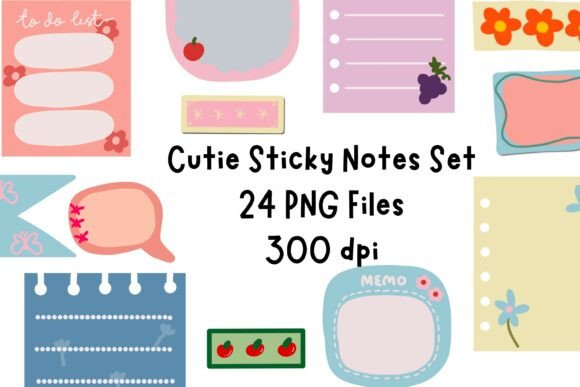
In the evolving landscape of digital productivity, the visual appeal of your workspace is no longer just a matter of aesthetics; it is a functional component of cognitive organization. As professionals, educators, and creators migrate from paper to tablets, the need for tools that bridge the gap between rigid digital structures and the flexibility of analog thinking becomes paramount. The Cute Sticky Notes Set emerges as a vital asset in this transition, offering more than just decorative elements. It provides a structured yet playful method for capturing thoughts, organizing tasks, and maintaining visual hierarchy within digital environments.
Integrating these high-resolution PNG assets into your daily routine requires understanding where they fit within your broader workflow. Whether you are managing complex projects in GoodNotes, sketching lesson plans in Notability, or organizing personal goals in Noteshelf, these sticky notes serve as dynamic anchors for your information. They allow for rapid deployment of reminders and ideas without disrupting the flow of your primary document structure.
Integrating Visual Cues into Digital Workflows
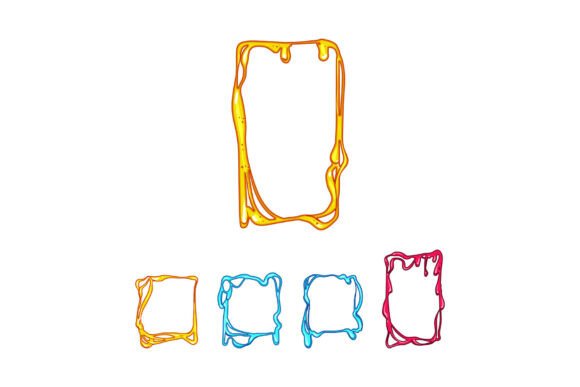
The primary challenge in digital planning is often the "blank canvas" paralysis or the rigidity of pre-made templates. Unlike static template elements, the Cute Sticky Notes Set offers modularity. Because each note is provided with a transparent background, it can be layered over any existing page design, photo, or text block without obscuring critical information. This transparency is crucial for maintaining context while adding new layers of data.
When implementing these notes into your system, consider their role in the capture phase of your workflow. In productivity methodologies like Getting Things Done (GTD), the initial capture of ideas must be frictionless. Digital sticky notes mimic the physical act of jotting down a thought on a scrap of paper. By using the flattened versions of these notes, you create a clean, distraction-free zone for quick input. Once the idea is captured, you can move, resize, or recolor it as the project evolves. This flexibility supports an iterative planning process, where ideas are not fixed until they are ready to be formalized.
Optimizing for Compatibility and Quality
Technical compatibility is a non-negotiable factor when selecting digital assets. The Cute Sticky Notes Set is designed specifically for high-performance use across major digital planning applications. The files are high-resolution PNGs, ensuring that when you zoom in on your tablet—whether it is an iPad, Android tablet, or Surface Pro—the edges remain crisp and the colors vibrant. Pixelation can break immersion and reduce the perceived professionalism of your documents, so starting with high-quality source files is essential.
Furthermore, the inclusion of two distinct versions for each design—flattened and shadow effect added—provides strategic depth. The shadowed versions add a sense of depth and layering, making them ideal for pages where you want certain notes to "pop" off the screen, drawing immediate attention. Conversely, the flattened versions are perfect for printing or for users who prefer a minimalist, two-dimensional aesthetic. Understanding when to use which version allows for better visual hierarchy in your documents. For instance, use shadowed notes for urgent action items and flattened notes for archival reference or secondary details.
Practical Applications Across Professional and Personal Domains
The versatility of these sticky notes extends far beyond simple journaling. Their application varies significantly depending on the user's role and objectives. Here is how different professionals can integrate this set into their specific workflows:
- Educators and Tutors: Use the notes to highlight key concepts in lecture slides or student worksheets. The playful aesthetics can make dry material more engaging for younger students, while the clear typography ensures readability for older learners. You can place a sticky note over a diagram to ask a probing question, encouraging active participation during remote or hybrid lessons.
- Project Managers and Entrepreneurs: In agile workflows, visual management is key. Use the sticky notes as digital Kanban cards within your planner. Move them from "To-Do" to "In Progress" to "Done" columns. The ability to easily resize and reposition these elements makes them superior to static text boxes for dynamic project tracking.
- Content Creators and Bloggers: When brainstorming content calendars, use the notes to map out themes, keywords, and publication dates. The charming colors can be color-coded to represent different content pillars, such as educational posts, behind-the-scenes updates, or promotional material. This visual coding speeds up the review process and helps maintain a balanced content strategy.
- Students and Researchers: During the annotation phase of reading academic papers or textbooks, place sticky notes directly over digital PDFs. Use them to summarize paragraphs, flag citations, or note down questions for further research. The transparent background ensures that the underlying text remains visible, preserving the context of your annotations.
Establishing a Consistent Organizational System
To maximize the efficiency of the Cute Sticky Notes Set, consistency is vital. Randomly placing notes can lead to visual clutter rather than clarity. Develop a personal syntax for how you use colors and shapes. For example, you might decide that pink notes always represent personal tasks, while blue notes are for professional deadlines. This semantic coloring reduces cognitive load, allowing you to scan a page and instantly understand the nature of the information presented.
Organization also involves file management. Since this is an instant digital download, store the PNG files in a dedicated folder on your device or cloud storage that is easily accessible from your planning apps. Many users create a "Stickers" or "Assets" folder within their app’s import directory. This preparation step eliminates friction when you are in the flow state and need to insert a note quickly. If you have to search through multiple folders to find the right asset, the utility of the tool diminishes.
Enhancing Aesthetics Without Compromising Function
While functionality is the core purpose, the aesthetic quality of the Cute Sticky Notes Set plays a psychological role in motivation. A visually pleasing planner is one you are more likely to open and use consistently. The charming colors and playful designs inject personality into what can often be a sterile digital environment. This emotional connection to your tools can reduce procrastination and increase engagement with your planning routine.
However, it is important to balance decoration with readability. Ensure that the text you write on top of the sticky notes contrasts well with the background color. Most digital pens offer a variety of ink colors; stick to dark inks for light-colored notes and white or light inks for darker accents. Testing your pen settings before committing to a full page of notes ensures that your hard work remains legible and professional.
Long-Term Usability and Scalability
One of the significant advantages of digital assets like this sticky note set is their infinite reusability. Unlike physical sticky notes, which are single-use and generate waste, these PNG files can be duplicated infinitely. This scalability is particularly useful for recurring tasks. If you have a weekly review process, you can create a master template with your preferred sticky note layout and duplicate it every week. This standardization saves time and ensures that no step in your review process is overlooked.
Moreover, as your needs change, you can adapt the usage of these notes. A note used for a short-term reminder today can be archived and used as a historical marker in a future review. The digital nature of these assets allows for seamless integration into long-term knowledge management systems. You can copy a completed sticky note from your daily planner into a monthly review document, preserving the context and the visual cue associated with that task.
In conclusion, the Cute Sticky Notes Set is not merely a collection of images; it is a functional tool for enhancing digital literacy and organizational efficiency. By understanding its technical features, integrating it into established workflows, and maintaining a consistent organizational system, users can transform their digital planning experience. Whether you are a busy entrepreneur managing multiple streams of income or a student navigating a complex curriculum, these sticky notes provide the flexibility and charm needed to make digital planning both effective and enjoyable. Embrace the blend of form and function, and let these small digital accents bring order and personality to your virtual workspace.