Mastering the Use of Bride and Groom Wedding Couple SVG PNG Files for Professional Results
Creating memorable wedding stationery or launching a successful print-on-demand store requires more than just a good idea; it demands high-quality assets that perform flawlessly across various mediums. The Bride and Groom Wedding Couple SVG PNG bundle has become a staple resource for designers, crafters, and small business owners looking to add a touch of romance and elegance to their projects. However, simply downloading a file is not enough. Many creators overlook critical technical details that can compromise the final product, leading to wasted materials, frustrated clients, or subpar designs.
Understanding the nuances of vector versus raster graphics, licensing restrictions, and design compatibility is essential. This guide addresses common pitfalls associated with using wedding silhouette bundles and provides actionable advice to ensure your creative output remains professional, efficient, and visually stunning.
The Hidden Complexity of File Formats
One of the most frequent mistakes beginners make is treating all digital files as interchangeable. A Bride and Groom Wedding Couple SVG PNG package typically includes multiple formats, such as EPS, SVG, DXF, and PNG. Each serves a distinct purpose, and using the wrong one can drastically affect quality.
For instance, many users attempt to scale a PNG file for a large wall decal or a banner. Since PNGs are raster images, they rely on pixels. Enlarging them beyond their original dimensions results in pixelation, blurriness, and a lack of professional polish. In contrast, SVG, EPS, and DXF files are vector-based. They use mathematical paths to define shapes, allowing you to resize the bride and groom silhouettes from a tiny sticker to a life-size cutout without any loss in clarity.
Practical Advice: Always use vector files (SVG, EPS, DXF) for cutting machines like Cricut or Silhouette, and for any project requiring resizing. Reserve PNG files for digital mockups, web graphics, or sublimation printing where the exact pixel dimensions are known and fixed.
Licensing Misunderstandings and Commercial Risks
Another critical area where creators stumble is licensing. While many bundles advertise "commercial use allowed," the specifics matter. Some licenses permit unlimited sales of physical products, such as T-shirts, mugs, and tote bags, but strictly prohibit the resale of the digital file itself or its use in logo trademarks. Ignoring these distinctions can lead to legal issues or account suspensions on platforms like Etsy or Amazon Merch.
Furthermore, some creators assume that because a file is labeled for commercial use, they can modify it extensively and claim it as their own original artwork. This is rarely the case. Most licenses allow you to incorporate the Bride and Groom Wedding Couple SVG PNG elements into a larger, unique design, but not to sell the standalone silhouette as a new digital asset.
What to Check: Before launching a product line, read the license agreement thoroughly. Look for clauses regarding "print-on-demand" limits, attribution requirements, and restrictions on digital redistribution. If the terms are ambiguous, contact the creator for clarification rather than assuming permission.
Design Compatibility and Aesthetic Cohesion
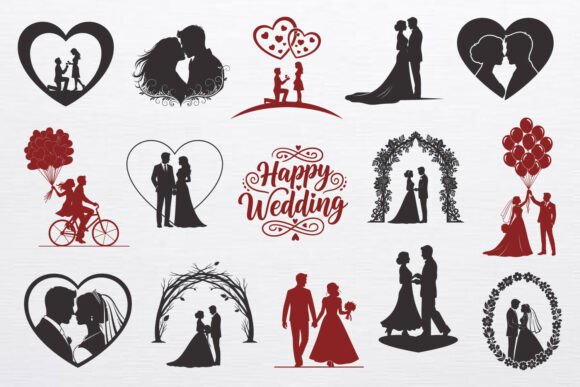
A common aesthetic error is forcing a specific style into a project where it does not belong. The included romantic bride and groom silhouettes, proposal scenes, and floral arches are designed with elegance in mind. However, pairing detailed, intricate silhouettes with cluttered backgrounds or incompatible fonts can dilute the visual impact.
For example, using a highly detailed floral arch SVG alongside a bold, modern sans-serif font may create a disjointed look. Similarly, placing complex balloon designs over busy patterns can make the image difficult to decipher, especially when printed on smaller items like stickers or save-the-date cards.
Better Approach: Embrace negative space. Let the solid silhouettes breathe. When creating wedding invitations or scrapbook pages, pair the decorative “Happy Wedding” lettering with simple, complementary elements. If using the detailed silhouettes for T-shirt printing, ensure the fabric color contrasts sharply with the design to maintain visibility and elegance.
Technical Preparation for Cutting and Printing
Even with the correct file format, technical preparation errors can ruin a project. Users often skip the step of "welding" or "unioning" paths in their design software before sending files to cutting machines. This can result in tiny, uncut pieces falling out of the vinyl or paper, particularly in intricate areas of the floral arches or detailed dress textures.
Additionally, when preparing files for sublimation on mugs or pillows, failing to mirror the image can lead to reversed text or awkward positioning of the couple’s faces. For DTG (Direct to Garment) printing, ignoring color profiles may result in muted or inaccurate colors, diminishing the romantic appeal of the design.
Actionable Steps:
- Weld Paths: Always combine overlapping shapes in your vector software to ensure clean cuts.
- Mirror Images: Remember to flip designs horizontally for heat transfer vinyl applications.
- Check Resolution: If using PNGs for printing, ensure they are at least 300 DPI at the intended print size.
- Test Prints: Always run a small test print or cut on scrap material before committing to final stock.
Maximizing Versatility Across Projects
To get the most value from your Bride and Groom Wedding Couple SVG PNG bundle, think beyond traditional wedding invitations. These assets are versatile tools for various entrepreneurial ventures. The proposal scenes can be adapted for engagement party decorations, while the heart frames work beautifully for anniversary gifts or Valentine’s Day merchandise.
Small business owners can leverage the decorative lettering and silhouettes for niche markets. Consider creating themed scrapbook kits, custom wall art for newlyweds, or even educational materials for wedding planning workshops. The key is to adapt the core elements to fit the specific emotional tone of each project.
Final Checklist Before You Create
Before you finalize any design using these assets, pause and evaluate your work against these criteria:
- File Format: Are you using vectors for scaling and cutting?
- License Compliance: Does your intended use align with the commercial terms?
- Visual Balance: Is the design cluttered, or does it allow the silhouettes to stand out?
- Technical Readiness: Have you welded paths, mirrored images, and checked resolution?
- Target Audience: Does the style resonate with the specific demographic you are targeting?
By avoiding these common mistakes and adhering to best practices, you can transform a simple digital download into a high-value, professional-grade product. The Bride and Groom Wedding Couple SVG PNG bundle offers a rich foundation for creativity, but it is your attention to detail and technical precision that will ultimately determine the success of your projects.